UTM's Game Console
Help File
This game listing is designed solely for use by a specific group of tertiary education students allowing them to upload their works for review. Do not register and use this system if you do not belong to this category.
This youtube video will provide you will all information required to upload a game on the platform and to perform a review of uploaded games
Public Listing
Games flagged for Public listing are available for preview without registering in the system.
Registration
Click on Login from Top Menu followed by Register. Fill in all the mandatory fields and click on Register.
A valid email address is required to activate account. An email will be sent to yourmail box from the current domain.
Do Check your SPAM  / JUNK
  folders as well after Registration.
Username and email address are set to be unique across system. If you receive a message User already exists, do change you Username
If you still have difficulties to Log in after registration and you did not receive any email, contact your Class Rep. Class Reps have an interface to activate your account. Of course provided that email address in your registration is correct.
Note: Registration and submission on this platform are not compulsory. Normal submission process remains valid. Online submission deadline requires an minor extension on top of hard deadline to cater for time spend in the upload process (Usually 1-2 days.)
Uploading a game
Click on the Upload Game Menu to access the Games Upload page. Click on the + icon to submit game.
prerequisites
Before you upload your game, make sure you have the following
- A short Description of 80 Characters is required for listing. The full description can hold 4000 words but the same content as Short Description can be used. The field is Mandatory
- If you worked as a group, request all team members to register on system before uploading work. Only Team leader to upload game for group. The PDF report should contain a work breakdown and workings carried out by each team member.
- A Feature graphic of dimension 1024 x 512 in png or JPG. is mandatory. Do create one with any Graphics package available.The Feature graphic is visible in the game listing.
- Web Version. The web version should be compressed using ZIP compression only and the files should not be in a parent
folder. i.e. Do not select a Folder Index_No_Web and zip whole folder. Open Folder till .index.html is accessible then
compress same. The Filesize should not be more than 50 MB.
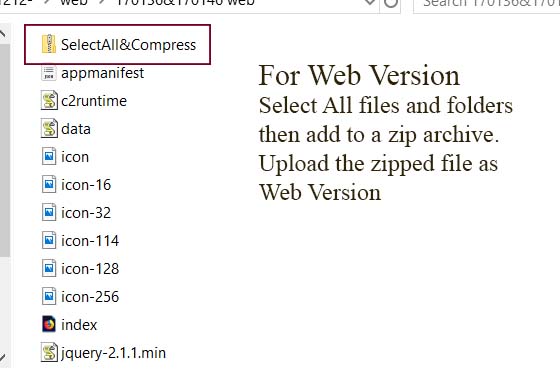
- PDF Report. PDF Report is mandatory and should have Index Number of all team members on cover. The Filesize should not exceed 20MB. It is recommended to reduce the filesize by saving the work for online viewing or by reducing the quality of the photos. Note: Report is available for view only by the Administrator
- Publish. You need to publish your game for submission and private listing. If Publish is set to no, listing will not happen.
- The maximum upload limit should be less than 90 MB and the timeout less than 10 minutes.If you receive a message 'Unknown Error' while uploading, do try again. You may want to ensure your connectivity speed is good before starting an upload
- If the files are heavy, do not upload several items together, wait for the individual uploads to complete.
- Tooltip available to provide useful info. If tooltip is obstructive, click on the Label to hide same.

Fill in the details for the game to add the game. Do note that the Upload Game page is a tabbed one with Tab 1 listed as Game Details and Tab 2 as Screens,Assets & Report
Majority of the fields for Tab2 are optional. The following fields will currently not display anything under listing: Screenshots, Promo Graphic and TV Banner. These fields can be ommitted.
Web Version: Please note that the system logs usernames, email and IP Addresses to audit uploads and prevent any misuse or abuse. Web Version should not contain any dynamic server side codes. Necessary actions as required may be taken if same is found to be present.
APK.If you have signed APK, Do upload the signed APK,else you may use unsigned APK. It is the duty of the developer(s) to ensure that APKs do not contain malicious codes or viruses. The author(s) will be held responsible for any damages caused by any malicious APK authored. Do cross check APK for any security issues before uploading.
Link to playsstore. If work is publicly available on playstore, please share link. If game is placed on any other stores like Amazon store or Apple, firefox etc do add provide link.
Windows APPX. If a windows version of game was created upload its APPX. Note: Games exported through NodeJS cannot be uploaded.
PowerPoint PPT: Optional - Upload PPT to help you carry out your game presentation properly and convince your audience for their reviews. Note: PPT can be viewed by all registered members of the system
Public Listing: This publishes the game for the general public visiting the website. If set to No, the game will be available to register viewers only.
After successful Submission of a game, the system will redirect you to the Full Game Listing. Click on the extract icon on first use to extract the zipped Web version of game. If game is not extracted, the web version of game will not be available.

Full game Listing
The full game listing provides registered users access to the PPT,Web Version, APK , Windows APPX and link to Playstore. Users are encourage to genuinely rate and review available games. An Aggregate of reviews / 50 provides the author an indication of his/her performance. Note: Administrators review are excluded from the displayed Averages.
My Reviews
Each member is expected to review at least 15 games. The 'My Reviews' page provides the user access to all games reviewed by the user.